1
/
of
11
eprolo
4-Port 24W USB Charging Station Dock with Device Organizer
4-Port 24W USB Charging Station Dock with Device Organizer
Regular price
$50.00 USD
Regular price
Sale price
$50.00 USD
Shipping calculated at checkout.
Quantity
Couldn't load pickup availability
Keep multiple devices organized while charging from one convenient desktop station. This 4-port USB charging dock provides up to 24W of total output and includes device support slots for a cleaner setup at home, in the office, or while traveling.
Product highlights
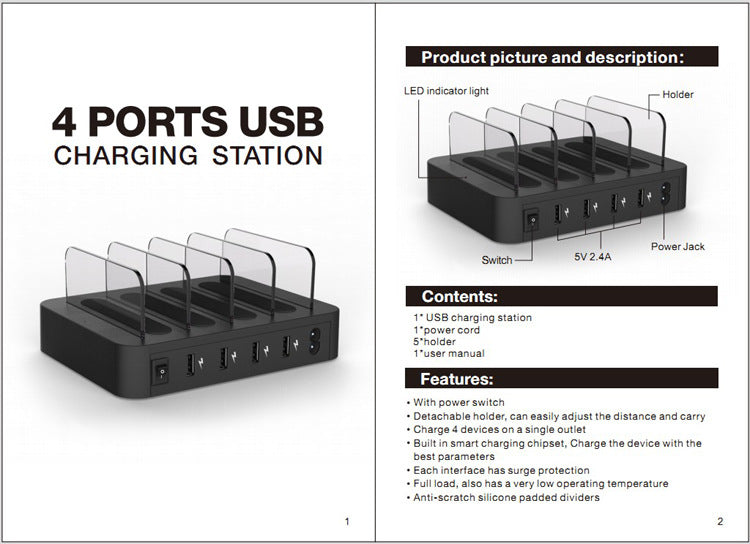
- Charge up to four devices: The dock provides four USB charging ports through one AC power connection.
- 24W total output: The product packaging identifies a total output of 24W.
- Port distribution: The listing identifies two ports rated up to 2.4A and two additional ports rated at 1A.
- Device organizer: Built-in support slots help keep smartphones, tablets, power banks, and other USB-rechargeable devices organized while connected.
- Smart charging chipset: The listing identifies a built-in chipset intended to provide suitable charging parameters for connected devices.
- Built-in protection: The listing identifies surge protection at the interfaces.
- Compact desktop setup: The dock is designed for home, office, travel, and other indoor charging areas.
Specifications
- Product type: 4-port USB charging station dock
- Total output: 24W
- Input: AC 100–240V, 50/60Hz
- Charging voltage: 5V
- Total output current: Up to 5A as listed
- USB port ratings: Two ports up to 2.4A and two ports up to 1A, as listed
- Variant: Black with US Plug
- Approximate dimensions: 19 × 14.5 × 7 cm
- Product weight: 600 g
What is included
- 1 × 4-port USB charging station dock
- 1 × 1.5 m AC power cable
- 1 × user manual
- Short device charging cables are not included
Compatibility note
Use with compatible USB-rechargeable devices, such as smartphones, tablets, power banks, Bluetooth speakers, and other devices that accept charging through USB. Charging performance depends on the device, cable, port used, and the device's supported charging rate. Connect only devices and cables that match the dock's USB output.
⚠ Important Safety & Care Instructions
- Connect the US plug and AC power cable only to a suitable electrical outlet within the listed AC 100–240V range.
- Do not use the dock with a damaged power cable, plug, housing, or USB port. Stop use if it sparks, smells unusual, becomes excessively hot, or shows exposed wiring.
- Keep the station dry and use it indoors on a stable, ventilated surface. Do not cover it while powered.
- Do not overload the station or connect devices that require more power than the listed output supports.
- Use compatible charging cables and do not force connectors into the USB ports.
- Disconnect the AC power before cleaning or moving the dock. Wipe it with a soft, dry cloth and do not immerse it in water.
- Keep the station, power cable, and connected devices away from children and pets when unattended.
(We Advise our customers to read our policies to understand how our store functions)
- Return/Refund Policy
- Shipping & Handling Policy
- Contact Information
- Terms of service
- Privacy Policy
- Legal Notice (Also important for copyright/Trademark Holders)
- (Link/Links Not Working? Email us Solidsales23100@gmail.com and ask us for a link to the policy you like to review)
SolidSales.Store Loyalty Rewards Program Information (Save & Earn)
- Earn Sales Points when you make a purchase ($1=1 Point)
- Redeem/Earn/Check your points at SolidSales.Store or (HERE)
Share